How every finance number is worked out — and how to check it
Before you sign something, you should be able to say where the figure came from and prove it in two minutes. For each number: where it lives, the arithmetic behind it, the check that proves it, and what a difference usually means.
Nothing matches that. Try a shorter word.
Quote total #
Where Quotes → the quote
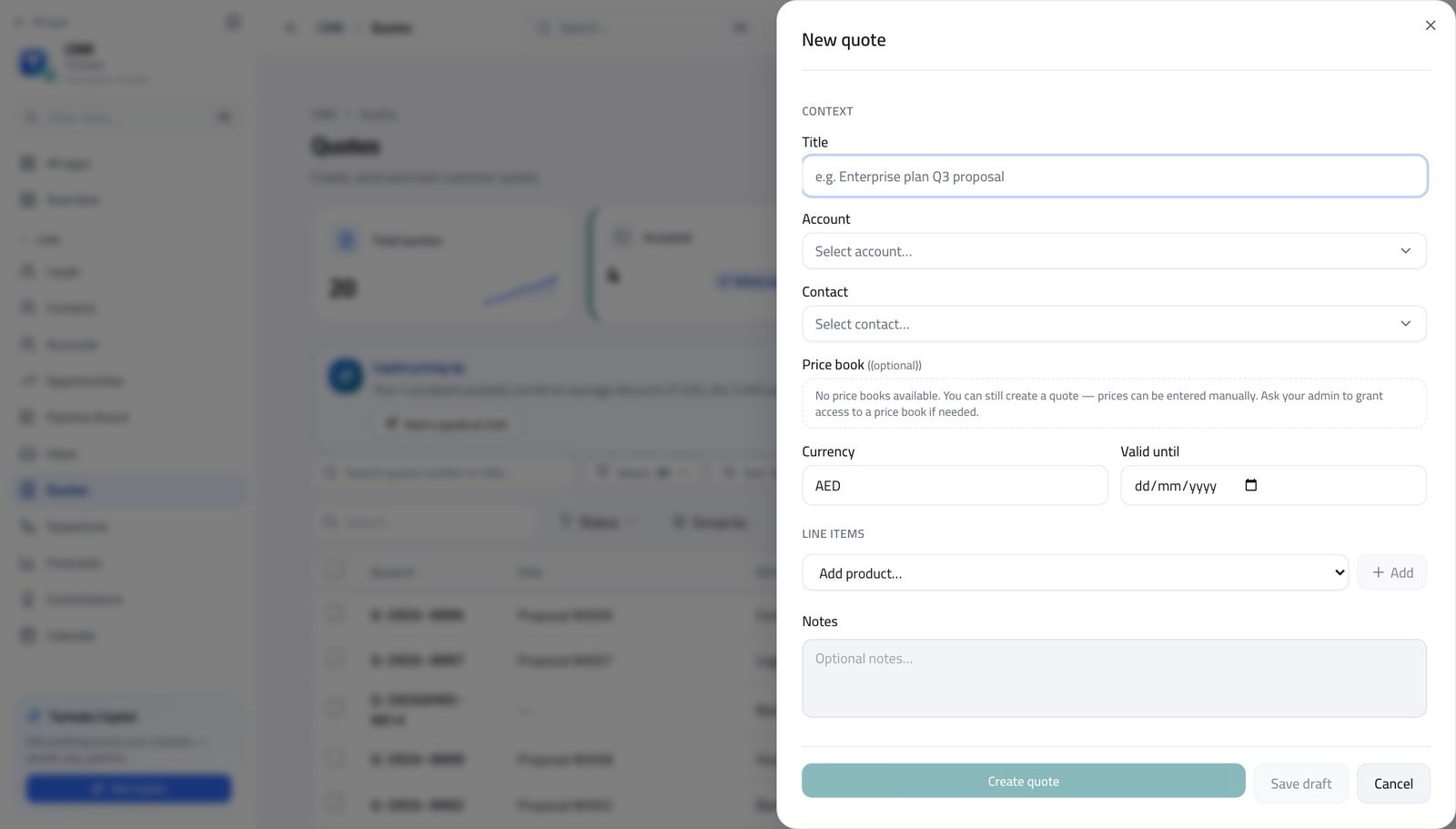
How it is worked out Each line is quantity × unit price. The line's discount percentage comes off that, then the line's tax percentage is applied to what is left. The quote's total is the sum of the lines, less the discounts, plus the tax.
Check it like this Add up the line amounts yourself and take the discounts off before you apply the tax. Tax is charged on the discounted amount, not the list amount — that order is the one that matters.
If it disagrees A total out by a whole percentage point is a tax rate on one line, not an error in the arithmetic. Open the line and look at its rate.
The discount that decides whether a quote needs approving #
Where Quotes → the quote, against CRM Admin → Approval matrix
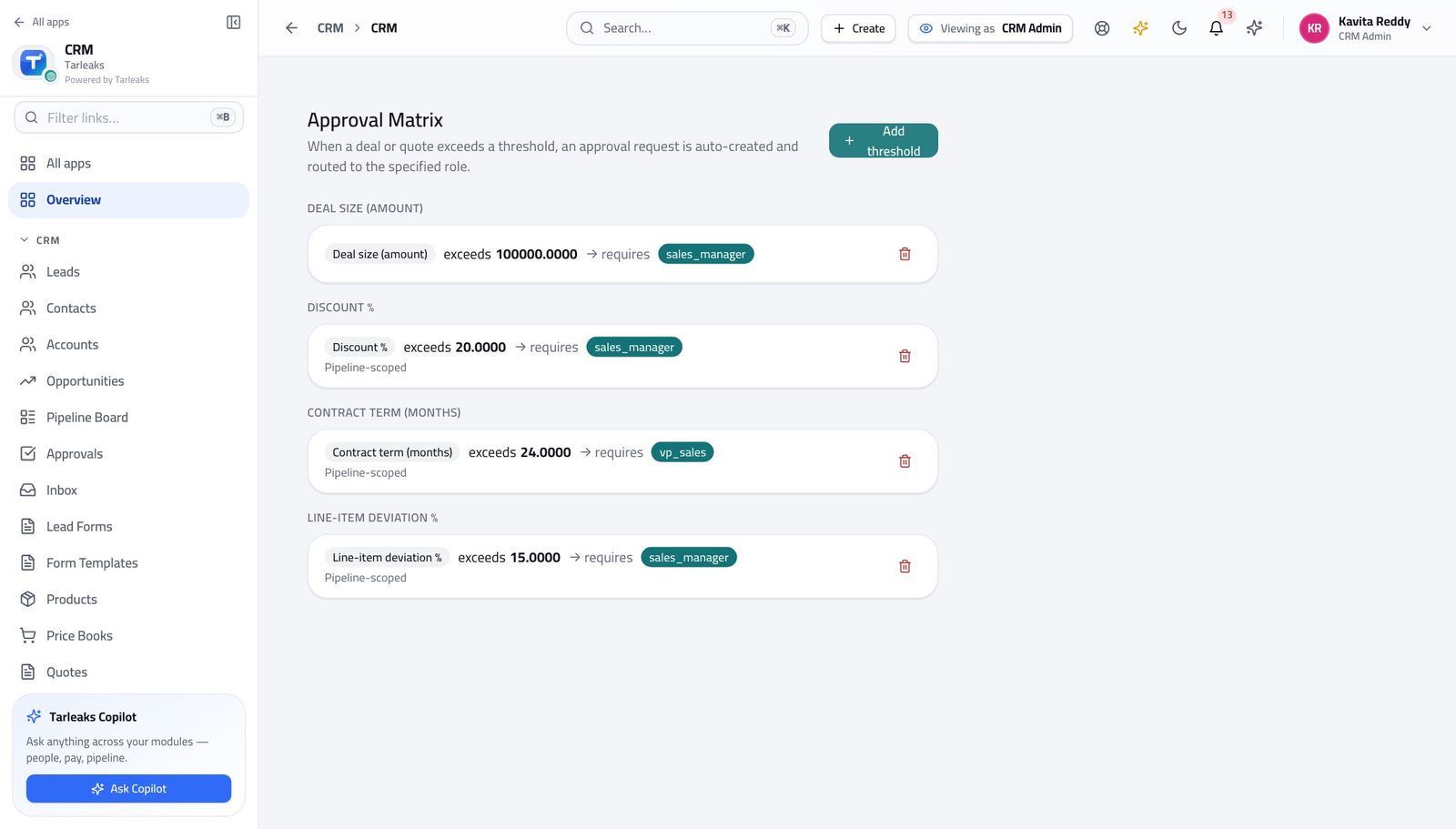
How it is worked out The whole quote's discount as a share of its subtotal — total discount divided by subtotal, as a percentage. It is compared with the LOWEST discount threshold configured for the tenant.
Check it like this Divide the discount on the summary by the subtotal above it. If that percentage is above the lowest threshold in the matrix, sending will refuse until the quote is approved.
If it disagrees People check the worst single line and are surprised. One line at 40% on a small quote can leave the whole quote under the threshold; several lines at 12% can push it over.
Weighted pipeline #
Where Forecasts
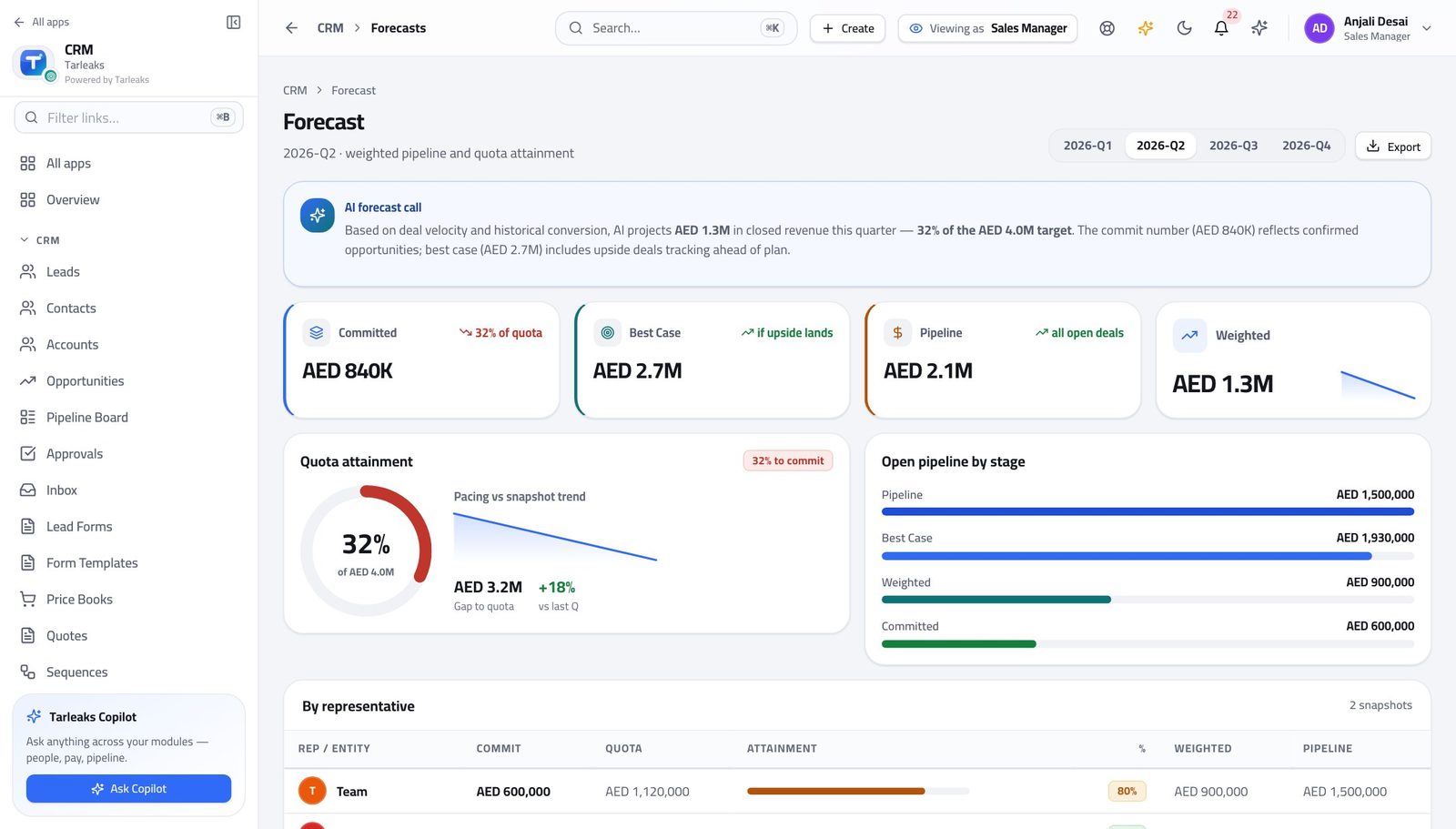
How it is worked out Every OPEN deal whose close date falls in the period, each multiplied by its stage's win probability. Won and lost deals are excluded.
Check it like this Open Opportunities for the same period, take three deals and multiply each amount by the probability shown on it. The forecast is that sum across every open deal.
If it disagrees A weighted number that looks too low is usually close dates: a deal dated outside the period is simply not in it, however real it is.
Committed and best case #
Where Forecasts
How it is worked out Committed is the full amount of every open deal at 90% probability or more. Best case is the full amount of every open deal at 70% or more. Neither is weighted — they are the whole amount or nothing.
Check it like this Filter Opportunities by stage and add the amounts. The two figures are cut-offs, not curves.
If it disagrees Moving one large deal up a stage can jump committed by its entire value in one step. That is the design, and it is why the stage probabilities have to be honest.
Quota attainment #
Where Forecasts
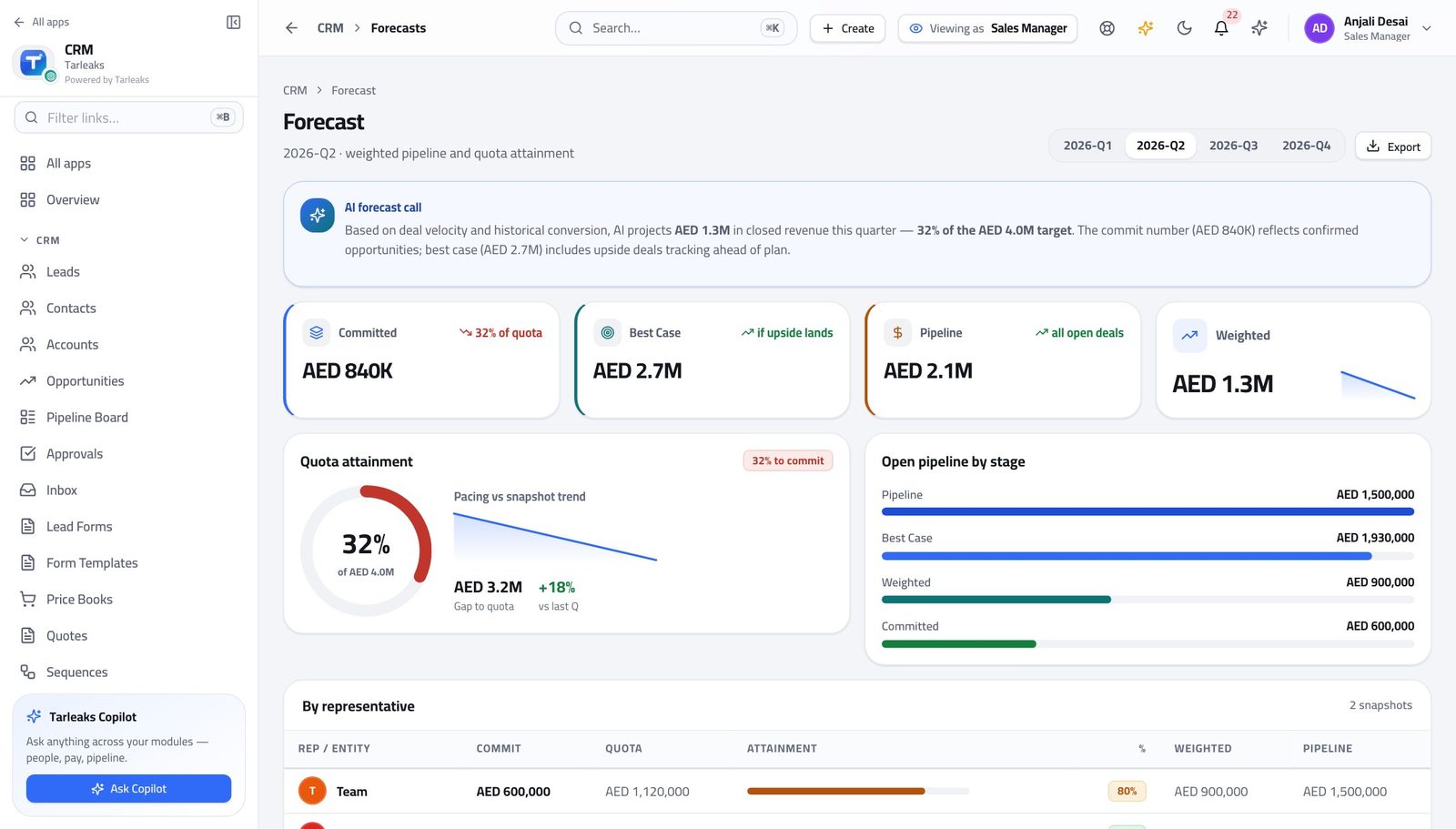
How it is worked out What has landed for the period against the quota set for that person or team and that period.
Check it like this Read the quota line beside the attainment. They are two separate records that happen to be shown together.
If it disagrees A quota that was never set reads as nothing, which makes attainment look enormous. Check the quota exists before anybody celebrates.
A lead's score #
Where Leads → the lead, against CRM Admin → Lead scoring
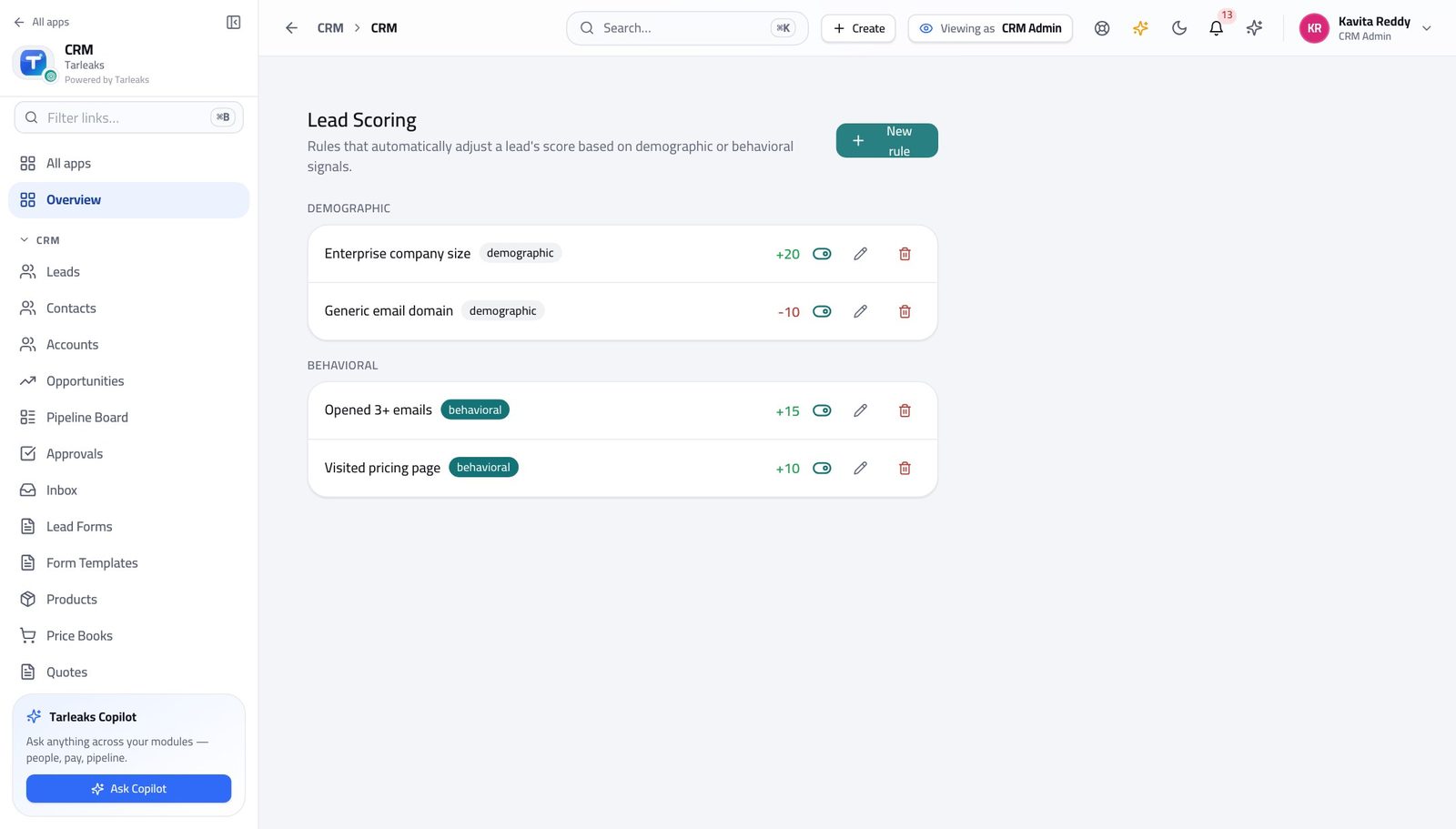
How it is worked out The sum of the active scoring rules that matched the lead — each rule adds or subtracts the points set on it, demographic and behavioural together.
Check it like this Open the scoring rules and add up the ones that plainly apply to that lead. There is no hidden part to the number.
If it disagrees A score that suddenly stops discriminating usually means somebody added a rule worth far more than the rest, which makes every other rule irrelevant.
A commission payout #
Where Commissions
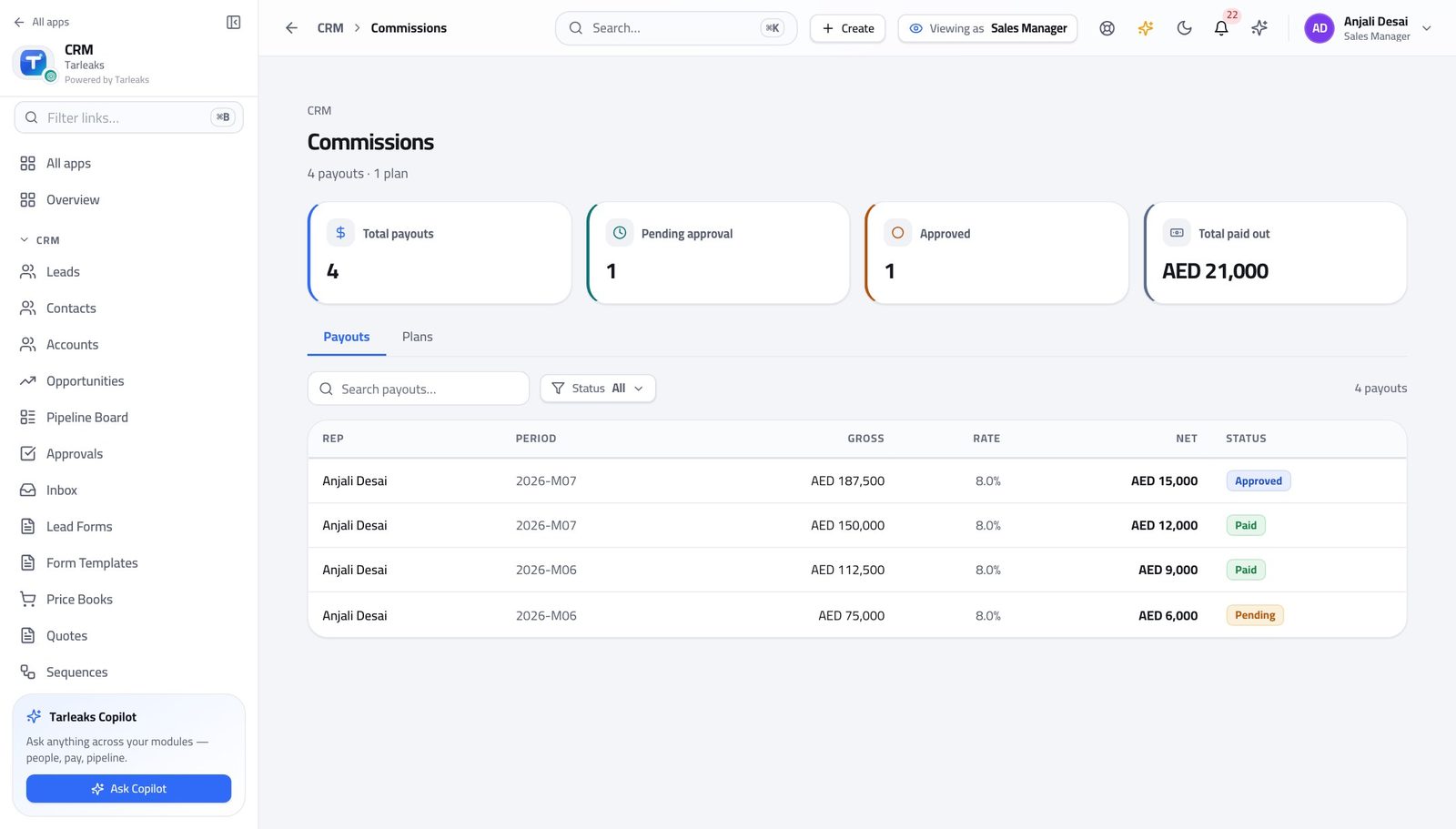
How it is worked out One payout per WON deal whose close date falls in the period and whose owner is that person: the deal amount multiplied by the rate for the tier that deal's size falls into, rounded to two decimals.
Check it like this Take one won deal, find its amount, and read the rate on the payout row beside it. The two multiply to the commission on that row.
If it disagrees A missing payout is nearly always the close date sitting outside the period, or the deal being owned by somebody else at the moment it was closed.
How many deals a person can see #
Where Opportunities
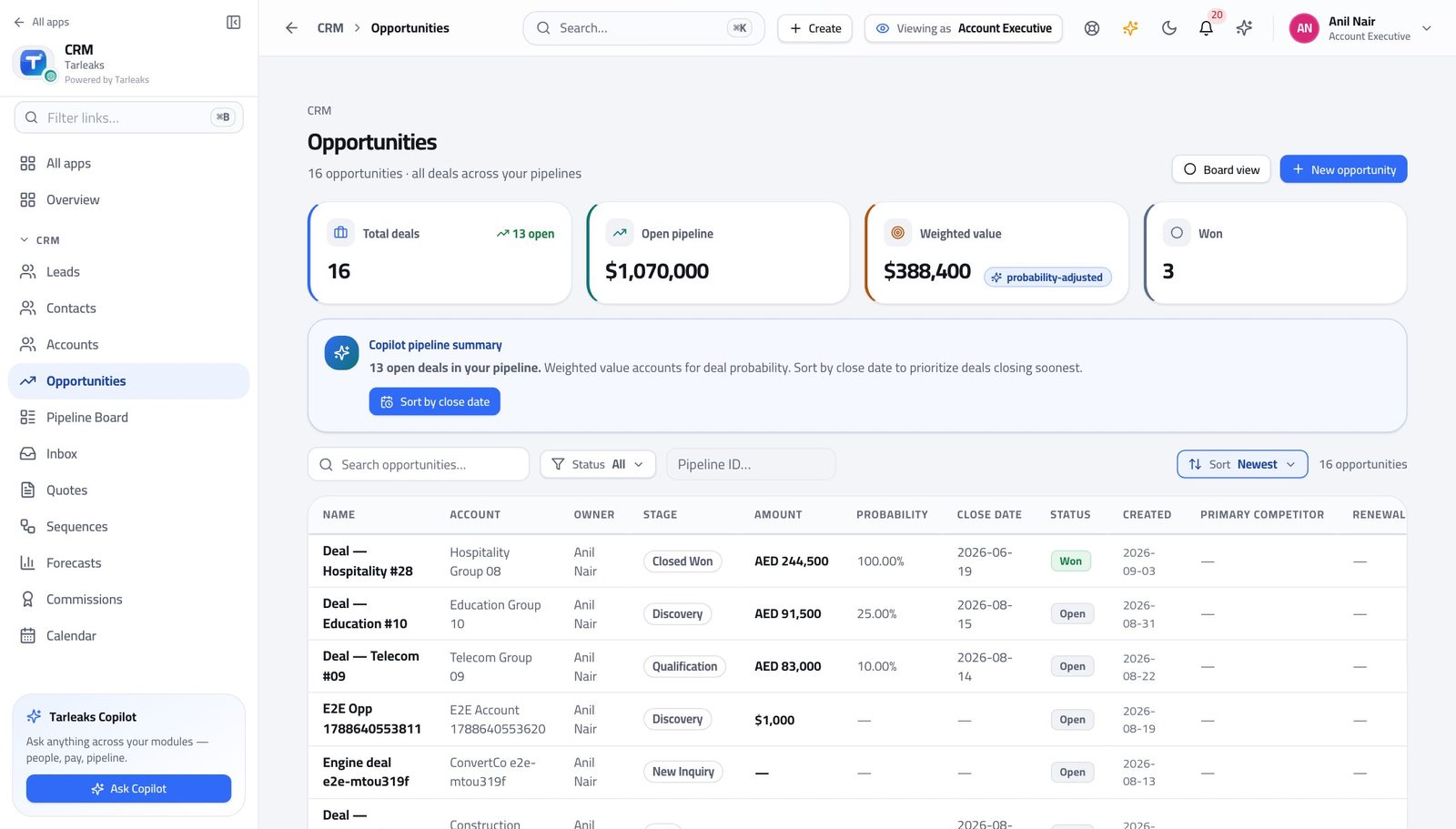
How it is worked out A rep is sent the deals they own. A manager is sent the team's. An administrator is sent everything.
Check it like this Compare the count in the subtitle with the same page opened by an administrator. A smaller number is the ownership rule working.
If it disagrees 'Records are missing' is almost always this and not a fault. A deal that should be somebody's is moved by their manager, not found by searching harder.
Which owner a new lead is given #
Where CRM Admin → Lead routing
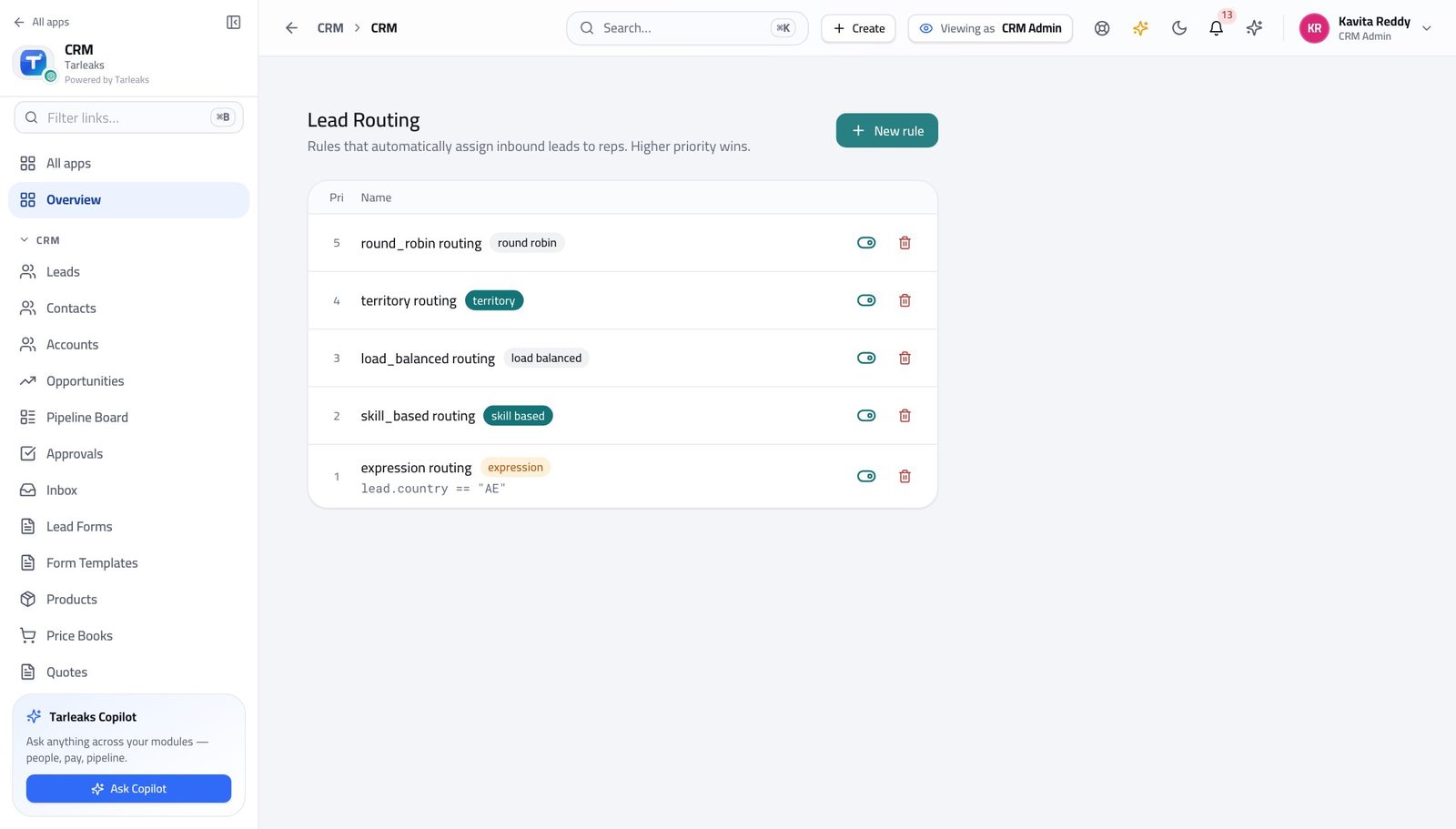
How it is worked out The rules are read from the highest priority down, and the FIRST one whose condition matches assigns the lead. Nothing below it is consulted.
Check it like this Read the rules top to bottom against a lead you have in front of you and stop at the first match. That is the answer the product reached.
If it disagrees A broad rule above a specific one swallows everything the specific rule was written for. Nothing errors, so it is only ever found by somebody complaining.
Which territory claims a record #
Where CRM Admin → Territories
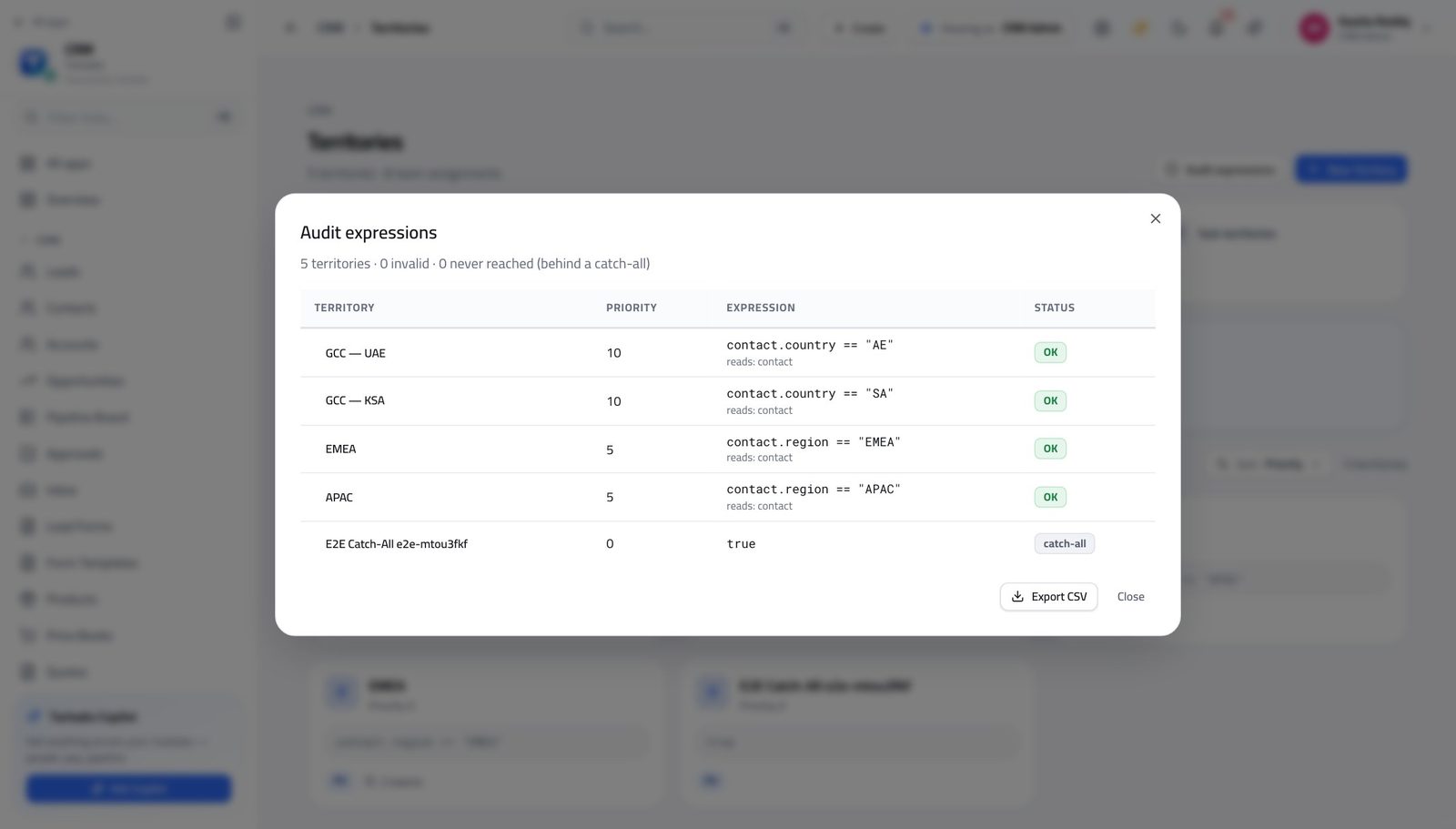
How it is worked out Territories are evaluated in priority order and the first whose rule matches claims the record.
Check it like this Run the audit over every rule. It names the ones that cannot be understood and the ones that can never match because something above them always does.
If it disagrees A rule of just 'true' matches everything. Anything below it is dead, and the audit is the only thing that will tell you.
Faster ways to do the same work
| What you want | How |
|---|---|
| Jump to anything without the menu | Press ⌘K (or Ctrl K) and start typing — pages, records and actions are all in the same box. It is also the only way to reach the CRM Admin screens, which are deliberately not in the sidebar. |
| Send a colleague exactly the list you are looking at | Copy the address bar. The filter you clicked and the tab you are on are written into the address, so they open your view rather than the default one — and it survives a refresh. |
| Do the same thing to forty records | Tick the rows, then use the bar at the bottom. It only offers actions your role can perform, and each record is still checked on its own. |
| Select everything you are looking at | Filter FIRST, then tick the box in the header row. It selects the filtered rows, not the whole table — which is the difference between moving a rep's deals and moving everybody's. |
| Move between records without going back to the list | The ‹ › arrows at the top of a record walk the list in the order you came from, and they respect the same ownership rules — so a rep walks their own book, not the company's. |
| Move a deal by dragging it | On the Pipeline Board, dragging a card into the next column IS the stage change. There is no second form afterwards. |
| Turn a summary box into a filter | Every count at the top of a list is clickable. Clicking it narrows the list to what it counts, and clicking again clears it. |
| Start a quote from the customer rather than from the menu | Accounts and Contacts both offer New quote on the record, which fills in the account and the contact for you. |
| Stop a sequence the moment somebody replies | Open the sequence's enrolments and remove them — before you write your answer, not after. An automatic follow-up landing on top of a real conversation is the fastest way to lose one. |
| Let the customer pick the time | Put a booking page link in your signature. A slot they choose becomes a meeting on the right record with no e-mails about times. |
| Ask instead of hunting | The copilot strip on each page answers questions about that screen's data — 'which of my deals slipped this month', 'what is waiting on me'. |
| Check a territory rule before a real lead hits it | Territories → Audit expressions. Every rule is checked at once and the dead ones are named. |
| Take the list with you | Every list exports what you are currently looking at — the filter applies to the export, so filter before you press it. |
| Work in Arabic | Switch the language in your profile. The interface mirrors right to left, and quotes print in the language the customer expects. |