العربية — This page is not in Arabic yet. Opens the Arabic home page.

Start free trialBook a demo

Browse the documentation

Documentation

All appsHow the apps connectTeam workflowsCompare

Apps

HR ManagementRecruitment (ATS)Payroll & WPSTime & AttendanceAccounting & E-InvoicingCRM & Sales PipelineSales Orders & FulfilmentInventory, Purchasing & WarehousingProcurement & TendersConstruction & ContractingContracts & E-SignatureProducts & Online StorePoint of SaleRentalsSubscriptions & LicensingHelpdesk & TicketingSocial Media SuiteInfluencer Marketing & Campaign ROIProject ManagementActivities WorkspaceDocument ManagementPDF Tools & E-SignatureCorrespondence RegisterTeam Chat & CallsMeetings & VideoLearning & Certification (LMS)Asset ManagementFleet ManagementRecognition & GamificationContacts & PartnersNotification CentreReports & DashboardsInsights — Business Intelligence & AppsAI CopilotAI Agents & AutomationAI Diagram StudioWebsite BuilderISO Compliance Suite (Imtithal)App MarketplaceCustomer & Partner PortalSecurity, Access & Compliance

Administrator — Inventory guide

See who posted which stock write, and when.

Reads who posted which stock write and when. The audit trail needs the company-wide audit key, so it is the administrator's (or the auditor's) screen: the inventory manager does not hold it.

What you will be able to do

  • Read the inventory audit trail

1 steps, each one carried out in the product on .

Find a lot's holds and date changes #

Where Inventory » Audit trail

  1. Open Audit trail and search for Lot.
  2. Each hold, release and change of a lot's dates is a row with who did it and when.
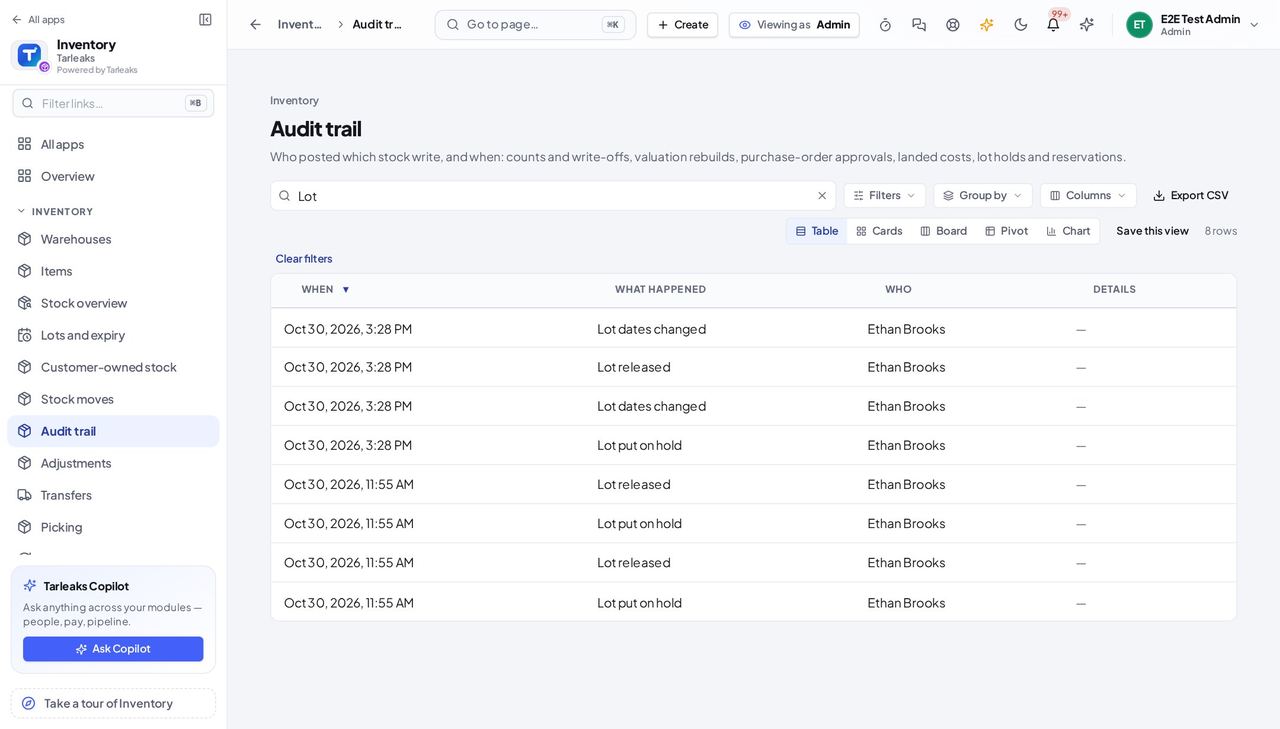
Screenshot: Find a lot's holds and date changes, Administrator view
Lot changes are on the same trail as the stock writes.

You should see Lot changes are on the same trail as the stock writes.

This screen needs the company-wide audit key, so it belongs to the administrator and the auditor. Everything else in Inventory is described in the roles above.

All inventory role guides

Last updated